Projects vs Jobber
There's no change order button in Jobber. There's one in Projects.
Jobber is genuinely good field-service software — scheduling, dispatch, invoicing, and online booking for landscaping, HVAC, plumbing, and cleaning crews running visits. It isn't built for multi-week construction: no cost-coded budgets, no change orders, no takeoff, no plans. Projects is built for the build.
Switch to Projects if…
- Your work is multi-week construction, not one-off or recurring service visits — you need a running budget, not just a quote and an invoice.
- You've hit the wall Jobber's own construction reviewers describe: no change order feature, so scope changes live in a note instead of a number.
- You need to show a client plans, take off quantities from a drawing, or price from your own catalog — none of that exists in Jobber.
- You're paying $29/month for every field tech on top of the office fee, and want your crew free instead.
Stay on Jobber if…
- Your business is recurring or one-off service calls — lawn care, cleaning, pool service, pest control — not multi-week builds with a running budget.
- Route optimization and drag-and-drop dispatch across a fleet of trucks in a single day is the core of your operation.
- Automated review requests, online self-booking, and (on their Plus tier) an AI phone receptionist matter more to you right now than a project budget.
We'd rather you pick the right tool than churn in a month. The honest answer is above; the detail is below.
Jobber is a field-service platform used by 250,000+ home-service pros, priced in four published tiers from $49/mo (Core, one user) to $499/mo (Plus, fifteen users). Its own pricing page says who it's for: "the pro who wants to build and grow their business," and "contractors who want to win bigger jobs." Construction is one of the 50+ trades it lists alongside lawn care, HVAC, cleaning, plumbing, and roofing.
Where it lives is scheduling and dispatch. Drag-and-drop crew routing, online self-booking, automated reminders and follow-ups, review requests, and QuickBooks sync from the Connect tier up — if your day is a calendar of visits and a fleet to route, Jobber is built for exactly that job, and it shows.
What it doesn't have is a construction budget. No cost codes, no budget-vs-actual at the project level, and — concretely — no change order feature: it's a long-standing request on Jobber's own community forum, and their help center's answer is to edit a job's line items and add a note rather than log a change. A construction-industry reviewer who rated Jobber five stars on Capterra flagged this exactly: no way to track a project's progress beyond visits, and no way to create a change order after a quote or job has changed. Independent reviews of construction software are consistent on the rest — no takeoff, no plans or drawing viewer, no purchase orders.
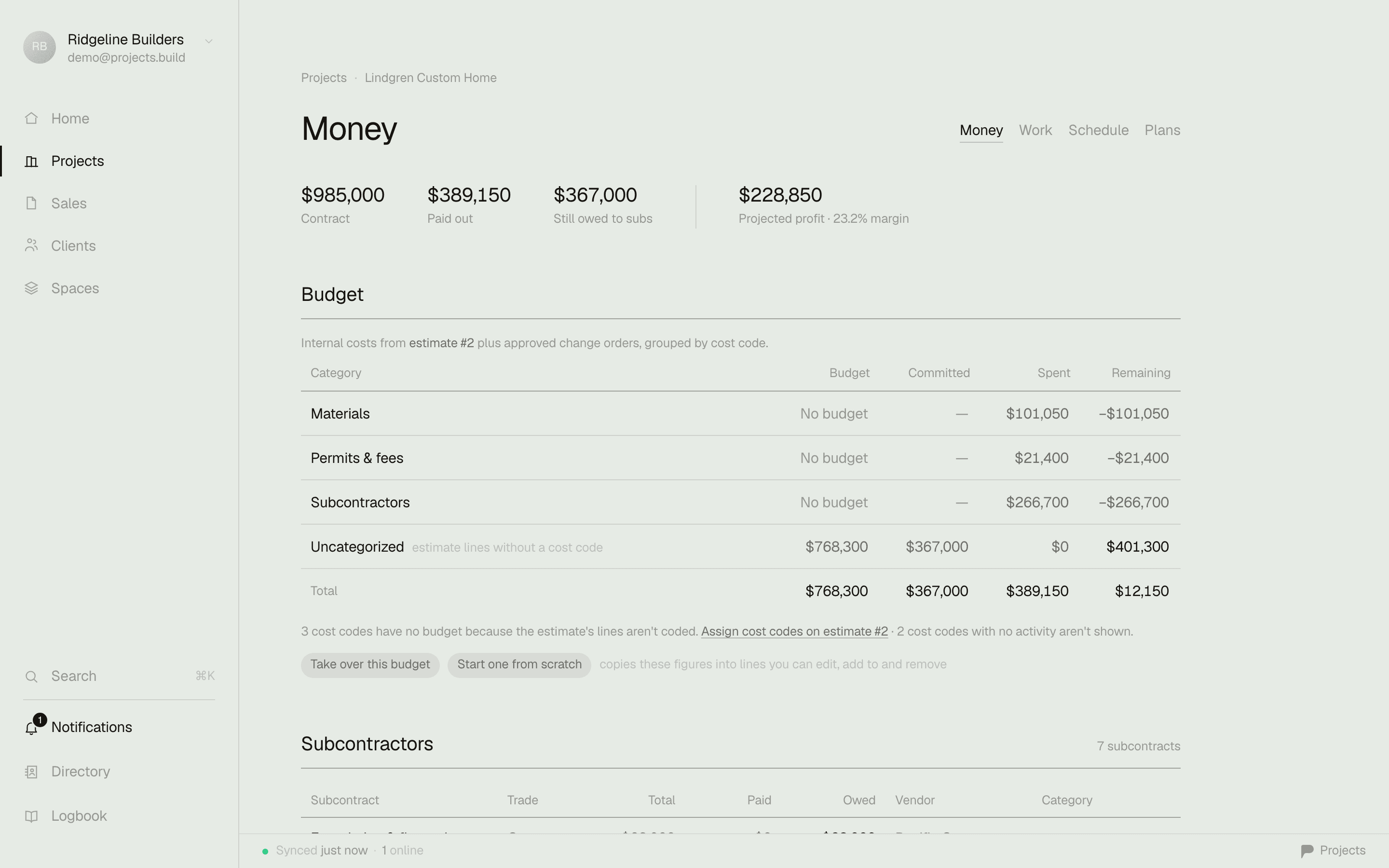
That gap is Projects' home turf: contract, spent, and remaining the moment you open a job; change orders that hit the budget automatically; estimates that become the job; takeoff priced from your own catalog; plans and redlines on site — one $39 office seat, and the field crew that Jobber bills like everyone else rides free.
“For ongoing projects, the only way to keep track of those is by using the notes under the client's profile and by creating additional visits… There is also no way to create a change order after a quote or job has been changed.”
Emma N., Administrative Manager in construction — a 5-star Capterra review of Jobber. The software earned the rating; a project's progress and its change orders are what she's missing.

The money answer, the moment you open a job — no export, no module, no training.
The lookahead test
A lookahead your client opens from a text.
Jobber's calendar is built for a day — drag a visit, route the truck, and it's a genuinely good one. There's no multi-week view a client reads as a project schedule. In Projects the lookahead is the client-facing document: pick 1–6 weeks, phases with live progress on your letterhead, then print it, email the PDF, or send a link that always shows the current window.

The actual export from the demo workspace — the same document is also a living URL your client can keep.
Comparison reflects our reading of each product for small-to-midsize builders, as of writing. Jobber is a capable product — see where it wins below.
Where Jobber is the better call.
No tool is right for everyone. Here's where they have us.
Dispatch and routing at volume
Real-time GPS routing and drag-and-drop scheduling across a fleet running a full day of stops — built for exactly that job, and it shows. Projects doesn't try to be a dispatch board.
Online booking & automated client comms
Self-serve booking, automated reminders, quote and invoice follow-ups, and review requests keep a calendar of repeat visits full without you chasing anyone. That's a different job than running a single build.
QuickBooks sync from Connect up
Two-way QuickBooks sync ships on their $139/mo Connect tier and above — real accounting integration, even if reviewers flag occasional reconciliation work. Projects exports a clean CSV today, with direct sync coming on Business.
Twenty-plus years and 250,000+ home-service pros
Jobber has been a default for lawn care, cleaning, and HVAC dispatch for a long time, with an AI phone receptionist and a marketing suite on their top tier. If your day is visits, not phases, that depth is real.
Where Projects wins.
A change order that hits the budget
Log the change, price it, and it lands on the contract total automatically — not a note under the client's profile and a re-sent quote.
A budget, not just a quote and an invoice
Contract, spent, remaining, and pending change orders, visible the moment you open the job — cost-tracked, not reconstructed from notes.
Takeoff and plans, because the drawing is the job
Trace a wall or a room and it prices from your own catalog into the bid; the same sheet lives on the project with redlines your crew can see on site.
Free field crew, always
Every tech and sub on the job gets the app at no charge — Jobber bills every user, office or field, the same $29 a month.
Switching is the easy part.
You don't have to pick one on day one. Keep Jobber running your service calls if you have them, and start one live construction job in Projects free — no migration required to try it. Export your money data to CSV any time; it's never locked in.
Common questions
Is Jobber good for general contractors and construction?
Jobber lists construction among the 50+ trades it supports, but its depth is built for recurring and one-off service visits — landscaping, cleaning, HVAC, plumbing. Independent reviews of construction software are consistent: no cost codes, no budget-vs-actual at the project level, and no change order feature. If your work is multi-week builds with a running budget, that's a real gap, not a workflow quirk.
Does Jobber have change orders?
No — it's an open request on Jobber's own community forum, and their help center's answer is to edit the job's line items and add a note rather than log a formal change. One Capterra reviewer in construction, who rated Jobber five stars overall, flagged this specifically: no way to track a project's progress beyond visits, and no way to create a change order after a quote or job has changed. Change orders in Projects are built in and hit the budget automatically.
How much does Jobber cost for a small team?
Jobber's own pricing page lists $49/mo for Core (one user, month-to-month) up to $499/mo for Plus (15 users) — and every user beyond a plan's included seat, office or field, is another $29/mo on any tier. A 2-office, 4-field-tech shop on Core runs about $194/mo. The same shop on Projects is $78/mo — two office seats, and the field crew is free.
Can I do a construction takeoff or view plans in Jobber?
No — Jobber has no takeoff tool and no plans or drawing viewer; it's quotes, scheduling, and invoicing for a service visit. Projects traces the drawing into priced quantities and keeps the sheet, with redlines, on the job.
Run your next job on it — free.
Start in five minutes. Keep your old tool running until you don't need it.
Sources: Jobber pricing page (tiers, per-user pricing, target copy) · Jobber community forum — change orders feature request · Capterra review of Jobber (Emma N., Administrative Manager, Construction) · Jobber vs. construction project management software analysis · Jobber overall rating on Capterra (4.4/5) — checked July 2026. Tell us if something drifted and we'll fix it.