Skip to content

Projects vs Procore

Procore charges by how much you build. We charge by who runs the office.

Procore is enterprise construction software priced on your Annual Construction Volume — an annual contract you get quoted on, implemented into, and trained for. Projects is the app for the other end of the market: owner-run and midsize builders who want the price on the page and the job on their phone.

Switch to Projects if…

  • You run 1–30 people and feel like you're managing the software as much as the job.
  • You want a price on the page, not a quote priced on your revenue and an annual contract.
  • Your client is a homeowner — you need proposals, e-signature, and a client portal, not RFI routing.
  • You want to be running jobs this week, not phasing in modules this quarter.

Stay on Procore if…

  • You're a commercial GC doing $25M+ with heavy RFI/submittal volume — that's Procore's home turf and it's genuinely the standard there.
  • You have an ERP (Sage, Viewpoint) and someone whose job is running the integrations.
  • Unlimited seats across owners, architects, and engineers on formal multi-party jobs is your daily reality.

We'd rather you pick the right tool than churn in a month. The honest answer is above; the detail is below.

Procore doesn't publish prices. Their pricing page says it plainly: an upfront annual fee, priced per product, based on your Annual Construction Volume — the dollar value of the work you run. Contractors report entry points around $375 a month, with typical small-GC contracts landing in the five figures a year. Land two more jobs and your software bill grows, even though your office didn't.

Then comes the rollout. Procore's own implementation guides describe a phased, weeks-long deployment per team, and their own onboarding research says most customers don't see value until months in. There's a reason a cottage industry of paid Procore implementation consultants exists.

None of that is a scam — it's what enterprise software costs, and for a 200-person commercial GC drowning in submittals it can be worth every dollar. But if you're an owner-run builder, you'd be signing an enterprise contract to use a fraction of an enterprise product — and at the end of it there's still no homeowner portal, no native e-signature (that's a DocuSign integration), and no estimating built for residential proposals.

Projects is built for the meeting you're actually in — the one with a homeowner. Tasks, schedule, money, plans, photos, proposals your client signs, and a crew that rides free. Procore is software you get trained on. Projects is software you just use.

If you have a smaller firm look the other way because it's overkill.

Verified Capterra review of Procore, from an architecture & planning firm — on a product reviewers rate 4.5 stars overall. It's good software. For a company that isn't yours.

app.projects.build
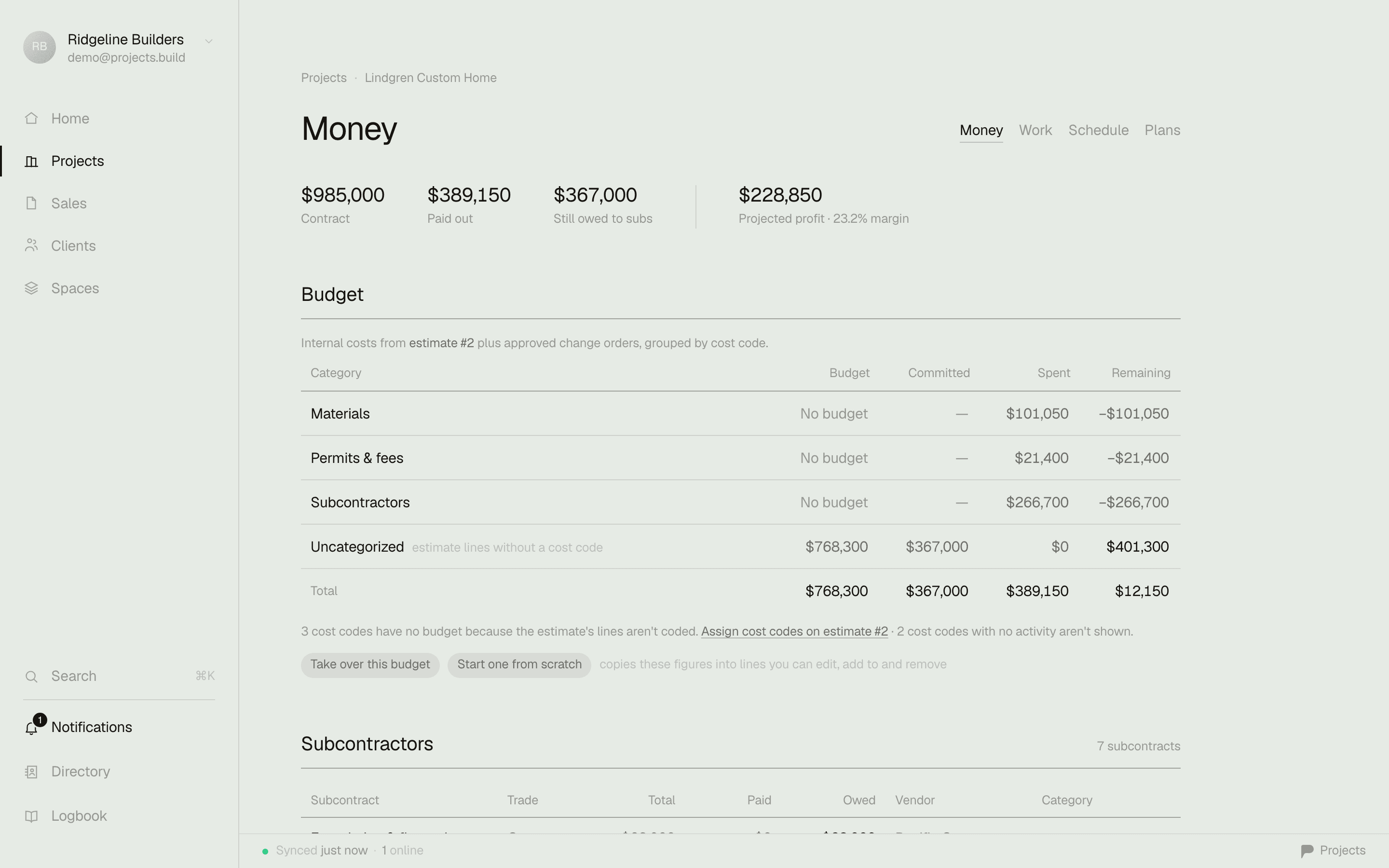
A project's Money tab in Projects — contract $985,000, spent $389,150, remaining $595,850, pending change orders $8,900, visible the moment the job opens

The money answer, the moment you open a job — no export, no module, no training.

The lookahead test

A lookahead your client opens from a text.

Procore's schedule is built for schedulers — powerful, and it looks like it. The weekly plan your client sees is whatever the export dialog produces. In Projects the lookahead is a first-class document: pick 1–6 weeks, week strips or a timeline, phases with live progress on your letterhead — then print it, email the PDF, or send a link that always shows the current window. No login, no portal, no stale attachment.

A 3-week lookahead from Projects — company letterhead, week strips with phases, tasks, and progress

The actual export from the demo workspace — and the same document is a living URL your client can keep.

Pricing
Projects — On the page. Free to start, $39 per office seat.
ProcoreNo published prices — quoted on your Annual Construction Volume.
How it scales
Projects — By office seats. Build more, pay the same.
ProcoreBy construction volume — grow and the bill grows with you.
Contract
Projects — Monthly, cancel anytime.
ProcoreAnnual, paid upfront, auto-renews.
Setup
Projects — Minutes. Make a workspace, add a job.
ProcorePhased implementation — their own docs plan it in weeks.
Client-facing
Projects — Proposals, e-signature, and a client portal built in.
ProcoreNo homeowner portal; e-signature via a DocuSign account.
Lookaheads
Projects — 1–6 weeks, on your letterhead — print, PDF, or a living link that's always current.
ProcoreA filtered export from the scheduling tool — formatted for schedulers, not homeowners.
Estimating
Projects — Estimates → proposal → signed, built in.
ProcoreA separately-priced product (acquired Esticom), aimed at takeoff.
Field crew
Projects — Free, unlimited — native iPhone app, offline on site.
ProcoreUnlimited users too (credit where due); capable app, cached-offline.
Built for
Projects — Owner-run & midsize builders.
ProcoreMid-to-large commercial GCs.

Comparison reflects our reading of each product for small-to-midsize builders, as of writing. Procore is a capable product — see where it wins below.

Where Procore is the better call.

No tool is right for everyone. Here's where they have us.

Enterprise scale

3 million projects run through it and thousands of customers paying six figures a year — on big commercial work, Procore is the standard, full stop.

RFIs & submittals at volume

Formal routing to design consultants, versioned drawings, audit trails. If submittals are the center of your day, Procore's depth there is real.

Unlimited users & 24/7 support

Every collaborator on a job gets in without a seat fee, and live support is included. Genuinely good — it's the pricing model around it that doesn't fit small shops.

Integration ecosystem

400+ marketplace integrations into Sage, Viewpoint, Bluebeam and the rest — valuable when you have someone whose job is to manage them.

Where Projects wins.

Priced like software, not a tax on your volume

$39 per office seat, crew free, price on the page. Procore's model scales with the dollars you build; their own investor metrics show the average existing customer paying roughly 14% more each year.

Built for homeowner work

Proposals a client signs on their phone, a clean client portal, selections-free simplicity. Procore's residential page targets portfolio developers — there's no homeowner portal at all.

The five-second money answer

Open a job and see contract, spent, and margin immediately. No export, no module, no training to find it.

Running this week

Free plan, one live job, five minutes. No sales call, no implementation phase, no certification courses — if software needs a seminar, that's the software's fault.

Switching is the easy part.

You don't have to rip the bandage. Start free, set up one live job in five minutes, and run it alongside Procore until you trust it. Export your money data to CSV any time — your data is yours. When you're ready, bring the rest over; we'll help.

Common questions

How much does Procore cost for a small contractor?

Procore doesn't publish prices — it's a custom annual contract priced on your Annual Construction Volume, quoted through sales. Contractors report entry points around $375/month, with typical small-GC contracts landing in the five figures per year before implementation help. Projects is free for one project and $39 per office seat per month after that, with the whole field crew free.

Does Procore work for custom home builders and remodelers?

It can, but it isn't built for them: there's no homeowner-facing portal, e-signature requires a DocuSign integration, and estimating is a separately-priced takeoff product. Procore's residential marketing targets portfolio developers. Small-firm reviewers on Capterra put it more bluntly — "overkill."

How long does Procore take to set up?

Procore's own implementation roadmap describes a phased rollout, group by group, over weeks — and their onboarding research is candid that value typically lands months after account creation. Projects takes minutes: make a workspace, add a job, invite the crew.

Do Procore prices go up at renewal?

Contractors commonly report 5–14% renewal increases, and Procore's own investor reporting shows net revenue retention around 114% — meaning the average existing customer pays about 14% more each year. Projects is $39 per office seat, monthly, and the founding cohort's price is locked forever.

Run your next job on it — free.

Start in five minutes. Keep your old tool running until you don't need it.

Or have us set it up with you →

Sources: Procore pricing page (ACV model, quote-only, unlimited users) · Procore rollout strategy docs · Capterra reviews of Procore · Procore FY2025 investor results · DocuSign integration FAQ — checked July 2026. Tell us if something drifted and we'll fix it.

Procore is a trademark of its respective owner. Projects is not affiliated with, sponsored by, or endorsed by Procore; the name appears here only to identify the product being compared.