Projects vs Contractor Foreman
Contractor Foreman has a hundred features. You have a job to run.
Contractor Foreman is a real bargain — over a hundred modules for a flat, unlimited-user price, with the price on the page. What that low sticker asks for is an annual commitment paid up front and, by many reviewers' accounts, a steep setup. Projects makes the opposite trade: the parts of the job you touch every day, native and fast, month-to-month, with the crew free.
Switch to Projects if…
- You want to be running a job this afternoon — not configuring modules for a month first.
- You've got a crew, and you don't want every field hand eating into your user tier.
- You'd rather pay month-to-month than lock a year up front to get the good price.
- You use a handful of the tools, not a hundred — and want the ones you use to feel fast.
Stay on Contractor Foreman if…
- You genuinely lean on the deep back office — certified payroll, OSHA safety toolbox talks, service tickets, inspections — and want it all under one flat fee.
- You have 15+ office users, where their flat unlimited-user tier beats per-seat math — that's honest, and it's their tier, not ours.
- Locked-in price certainty matters most: their Price Lock Guarantee genuinely never raises your rate.
We'd rather you pick the right tool than churn in a month. The honest answer is above; the detail is below.
Contractor Foreman earns its reputation as the affordable all-in-one. It publishes five tiers on the page — Basic at $49/mo up to Unlimited at $332/mo — and packs in over a hundred modules: estimating and job costing, GPS time cards, certified payroll, 800+ safety-meeting topics, service tickets, inspections, submittals. For a flat, unlimited-user price at the top, that's a lot of construction software for the money, and reviewers rate it 4.5 stars across 800-plus reviews. Credit where it's due.
Two things sit behind that low number. First, the advertised prices are annual plans, paid up front — quarterly billing runs about 25% more, and the cheapest tier is annual-only. Second, the tiers are gated by total user count — 1, 3, 8, 15, then unlimited — and office and field both count. Add a few crew and you climb a tier, so the "unlimited users" price and the entry price are the two ends of a ladder, not one flat deal.
And a hundred modules is a hundred modules to set up. Contractor Foreman's most consistent review complaint isn't the software's capability — it's the time to wield it. Reviewers describe a deep learning curve, a hundred details to configure, an interface that feels dated, and a mobile app that can be glitchy and slow to sync. The company includes free training precisely because the surface area is large. If you use all of it, that's a fair trade. If you use a fraction, you're configuring the other ninety.
Projects takes the other bet: the parts of the job you actually open every day — tasks, schedule, money, estimates your client signs, plans, photos, your sub book — made native and fast, learnable in an afternoon. One $39 office seat has the whole day job, the field crew rides free, it's month-to-month, and there's a free plan to start. Fewer tools, but the ones you use, and they open in seconds.
“It's complicated to work and set up. It has so many details…”
Nojan S., Project Coordinator in construction — a 4-star Capterra review of Contractor Foreman. The capability isn't the complaint; the setup is what it costs you.

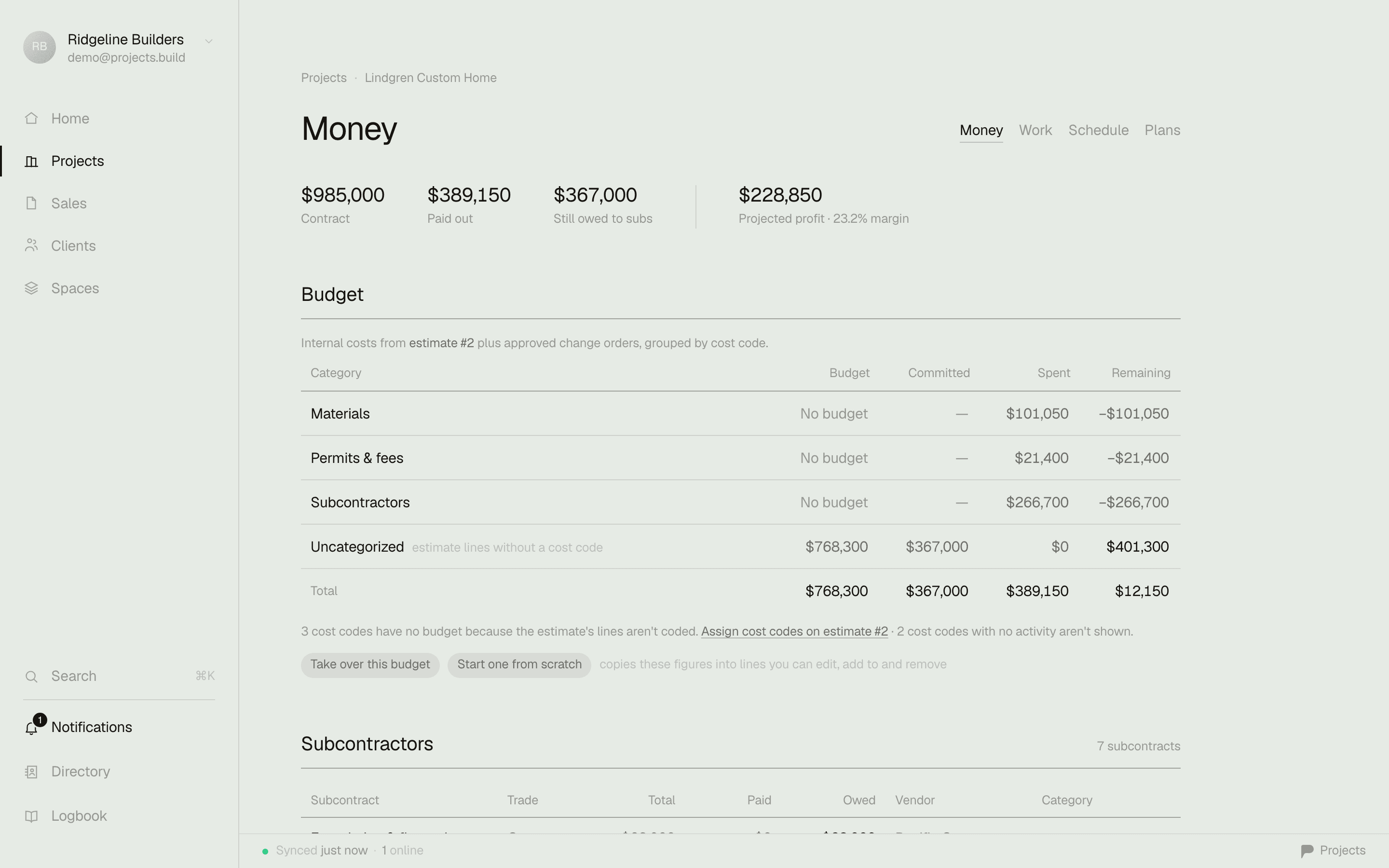
The money answer, the moment you open a job — no export, no module, no training.
The lookahead test
A lookahead your client opens from a text.
Contractor Foreman has a scheduler and a client portal — capable, and one more thing to set up. But the weekly plan your client actually reads means a portal login and a module. In Projects the lookahead is a document with a reader: pick 1–6 weeks, phases with live progress on your letterhead, then print it, email the PDF, or send one link that always shows the current window — no portal login for your homeowner to forget.

The actual export from the demo workspace — the same document is also a living URL your client can keep.
Comparison reflects our reading of each product for small-to-midsize builders, as of writing. Contractor Foreman is a capable product — see where it wins below.
Where Contractor Foreman is the better call.
No tool is right for everyone. Here's where they have us.
Sheer feature breadth for the money
Over a hundred modules — certified payroll, 800+ safety-meeting topics, GPS time cards, inspections, service tickets, submittals and RFIs. If you need a specific back-office tool, they probably have it, and Projects deliberately doesn't.
Flat unlimited-user pricing at scale
At 15-plus office users, their Unlimited tier at a flat $332/mo beats per-seat math. Our per-seat model favors the small office; theirs favors the big one. That's the honest trade.
Price Lock Guarantee
They commit that your locked rate never goes up — the opposite of the renewal-hike stories that dog bigger platforms. It's real, and it's rare. Credit where due.
Back-office extras at no add-on cost
GPS time tracking, certified-payroll reporting, and a deep safety-meeting library ship without add-on fees, even on lower tiers. If that's your back office, it's genuine value.
Where Projects wins.
Running in an afternoon, not a month
Fewer tools, native and fast — the parts of the job you use daily, learnable the day you start. No two-month configuration project before it earns its keep.
Month-to-month, free to start
A price on the page, cancel anytime, no annual commitment up front. Their 100-day money-back is annual-Plus-and-up only, and only after you complete a training session and add an estimate, a project, a time card, and a daily log.
The crew rides free
Field users never count against a tier. A 2-office, 6-crew shop is $78/mo here; on Contractor Foreman those same eight people put you on the Plus tier at $166/mo, billed annually.
The five-second money answer
Contract, spent, remaining, and pending change orders the moment you open a job — not a job-costing module you configure before it tells you anything.
Switching is the easy part.
Start free and run one live job in Projects alongside Contractor Foreman — no annual commitment to try it, and no migration required. Your money data here exports to CSV whenever you want; it stays yours. If you're mid-contract with them, run one real job over here and see the difference before your renewal comes up.
Common questions
How much does Contractor Foreman cost in 2026?
Contractor Foreman publishes five tiers, gated by total user count: Basic at $49/mo (1 user), Standard $105 (3 users), Plus $166 (8 users), Pro $221 (15 users), and Unlimited $332 (unlimited users). Those advertised prices are annual plans paid up front — quarterly billing runs about 25% more, and Basic is annual-only. Projects publishes its price too: free to start, then $39 per office seat, month-to-month, with the field crew free.
Is Contractor Foreman hard to learn?
It's feature-rich — over a hundred modules — and the setup and learning curve are its most consistent review complaint. A construction reviewer on Capterra called it "complicated to work and set up… so many details," and others note the curve is steep for field staff. Contractor Foreman includes free training to offset that. Projects takes the other approach: fewer tools, native and fast, and a job set up in an afternoon.
Does the crew count toward Contractor Foreman's user limit?
Yes. Every plan is capped by total users — office and field alike — at 1, 3, 8, 15, or unlimited. Add a few crew and you climb a tier. In Projects the field crew is free and unlimited; you pay $39 only per office seat, so a two-person office with a six-person crew is $78 a month, not a jump to the next plan.
Can I cancel Contractor Foreman anytime?
The advertised prices are annual plans paid up front. There's a 100-day money-back guarantee, but only on annual Plus, Pro, or Unlimited, and only after you complete a training session and add an estimate, a project, a time card, and a daily log. Projects is month-to-month — cancel anytime — and there's a free plan, so there's nothing to ask for back.
Run your next job on it — free.
Start in five minutes. Keep your old tool running until you don't need it.
Sources: Contractor Foreman pricing page (tiers, annual requirement, user counts) · Contractor Foreman refund & cancellation policy (100-day conditions, data retrieval) · Capterra reviews of Contractor Foreman (4.5/5, 800+ reviews) · Capterra pricing overview · Independent Contractor Foreman review (pricing, learning curve, mobile) — checked July 2026. Tell us if something drifted and we'll fix it.