Skip to content

Projects vs Buildertrend

Their pricing page doesn't have prices anymore. Ours does.

Buildertrend is a deep, twenty-year-old platform for residential builders — and as of 2026, finding out what it costs takes a quote form and a sales call. Projects is the lighter way: the whole job in one $39 office seat, crew free, price on the page.

Switch to Projects if…

  • You're paying hundreds a month for modules you barely open.
  • You've watched the renewal price climb and wondered what you're paying for.
  • You do a handful of jobs a year — their own pricing page targets shops doing five or more.
  • You're on CoConstruct and being told to migrate — you're already shopping.

Stay on Buildertrend if…

  • Selections, warranty workflows, and a mature homeowner portal are central to how you sell production homes.
  • Deep two-way QuickBooks sync is non-negotiable today — theirs is genuinely strong.
  • You have 15+ office users, where flat unlimited-user pricing beats per-seat math.

We'd rather you pick the right tool than churn in a month. The honest answer is above; the detail is below.

Buildertrend earned its twenty years. It covers the whole lifecycle — CRM, proposals, scheduling, selections, warranty, payments — and twenty thousand builders run on it. If you use all of it, it's a lot of software under one roof.

But load their pricing page today and you won't find a single dollar amount. It's a quote form: your builder type, your annual volume, your phone number, a sales call. The tiers they used to publish ran a few hundred to over a thousand a month, customers commonly report paying around nine thousand a year, and long-time users describe renewal increases that arrive without warning — one put it as "they know you have too much time invested in their product to switch."

Their own page also says who it's for: builders doing five or more projects a year and six to eight figures in revenue. If that's not you, you're not their customer — you're paying a whole-suite price to use a fraction of a suite, and the affordable tier historically left out the money features a remodeler actually needs.

Projects takes the opposite bet: the parts you touch every day — tasks, schedule, money, estimates your client signs, plans, photos, your sub book — made fast and native, all in one $39 office seat with the crew free — and a free plan to start on. If you'd rather run the job than run the software, that's the trade we're built for.

After four years they doubled the cost from one month to the next. They know you have too much time invested in their product to switch.

Long-time Buildertrend customer, via G2 reviews — on a product rated 4.5 stars on Capterra. The software is capable; the pricing relationship is the complaint.

app.projects.build
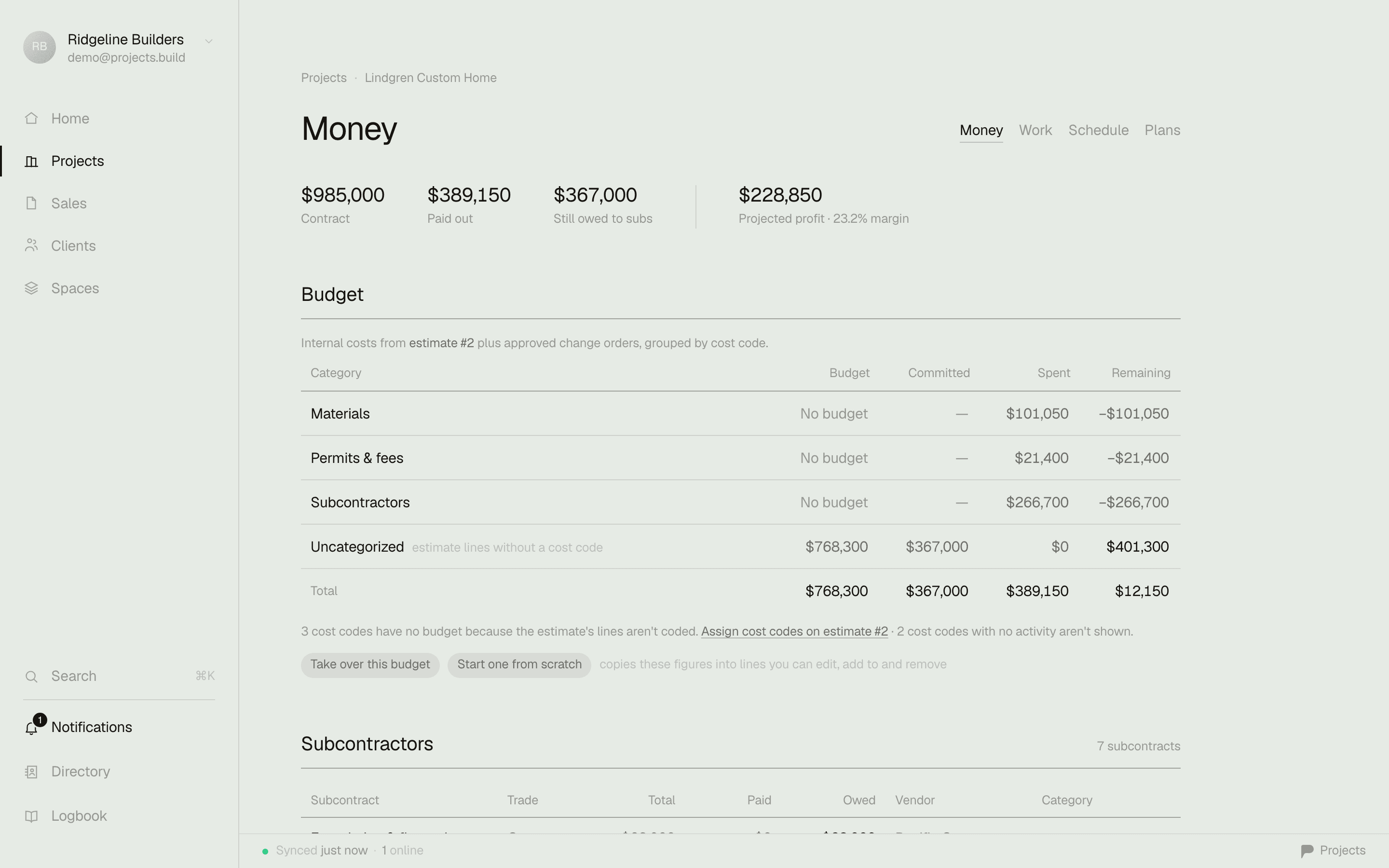
A project's Money tab in Projects — contract $985,000, spent $389,150, remaining $595,850, pending change orders $8,900, visible the moment the job opens

The money answer, the moment you open a job — no export, no module, no training.

The lookahead test

A lookahead your client opens from a text.

Buildertrend does client communication well — daily logs, a portal. But the weekly schedule your client actually reads is still something you export and re-send every time it changes. In Projects the lookahead is a document with a reader: pick 1–6 weeks, phases with live progress on your letterhead, print it or email the PDF — or send one link that always renders the current window, no portal login for your homeowner to forget.

A 3-week lookahead from Projects — company letterhead, week strips with phases, tasks, and progress

The actual export from the demo workspace — the same document is also a living URL your client can keep.

Pricing
Projects — On the page. Free to start, $39 per office seat.
BuildertrendNo published prices since 2026 — quote form, then a sales call.
Typical cost
Projects — A 2-office, 6-crew shop: $78/mo.
BuildertrendHistorically $339–$1,099/mo tiers; customers report ~$9,000/yr.
What you pay for
Projects — The whole job in one $39 office seat; free to start.
BuildertrendHistorically tiered; the entry tier lacked estimating & change orders.
Contract
Projects — Monthly, cancel anytime.
BuildertrendAnnual lock-in with auto-renew; onboarding packages extra.
Who they want
Projects — Your first job, free — however small.
BuildertrendTheir words: 5+ projects a year, 6–8 figures in revenue.
iPhone app
Projects — Native, offline on site, fast.
BuildertrendFeature-complete but reviewers call it clunky.
Lookaheads
Projects — 1–6 weeks on your letterhead — print, PDF, or a living link that's always current.
BuildertrendSchedule views and client updates exist, but the weekly plan is still an export you re-send.
Your data
Projects — CSV export any time — leave with everything.
BuildertrendReviewers report no bulk export; item-by-item retrieval.
QuickBooks
Projects — Clean CSV for your bookkeeper; direct sync coming on Business.
BuildertrendDeep two-way sync — genuinely strong. Credit where due.

Comparison reflects our reading of each product for small-to-midsize builders, as of writing. Buildertrend is a capable product — see where it wins below.

Where Buildertrend is the better call.

No tool is right for everyone. Here's where they have us.

Selections & warranty for production homes

If you're building spec homes with formal selections, allowances, and warranty tracking, Buildertrend has years of depth Projects doesn't try to match.

QuickBooks integration

Their two-way QuickBooks sync is mature and well-reviewed. Ours is a clean CSV today and a direct sync coming on Business — if deep sync is non-negotiable now, they win this one.

Front-office CRM & sales pipeline

Built-in lead management, bids, and proposals can run your whole pre-sale operation. Projects focuses on running the job, not the funnel.

Flat pricing at big-office scale

Unlimited users for one flat fee genuinely favors shops with 15+ office staff. Per-seat favors small offices — that's the honest math, and we're built for the small office.

Where Projects wins.

A price you can read — and keep

$39 per office seat on the page, crew free, monthly, cancel anytime. The founding cohort's price is locked forever — the opposite of the renewal-hike stories.

Free field seats, forever

Buildertrend bakes the whole company into one big flat fee. We charge for the office and the crew rides free — a 2-office, 6-crew shop pays $78, not $750.

No tier ladder for the day job

Estimates, change orders, plans, schedule, money — all in the $39 Pro seat. The only step up is Business, for the takeoff studio and the AI office.

Speed you feel

Opens in seconds, native on iPhone, works offline at the framing stage. Less to load, less to learn, more days it actually gets used.

Switching is the easy part.

Start free and run one live job in Projects alongside Buildertrend — no migration required to try it. Your data here exports to CSV whenever you want; it stays yours. Coming from CoConstruct's shutdown? Same deal — bring one job over, see if it fits, and we'll help move the rest.

Common questions

How much does Buildertrend cost in 2026?

Buildertrend no longer publishes prices — their pricing page is a quote form that asks your builder type and annual volume, then routes you to sales. The tiers they published until recently ran roughly $339 to $1,099 per month, customers commonly report paying around $9,000 a year, and onboarding packages have historically cost extra. Projects publishes its prices: free for one project, then $39 per office seat per month with unlimited free field seats.

Is Buildertrend worth it for a small builder?

Buildertrend's own pricing page targets builders doing 5+ projects a year with six-to-eight-figure revenue. If you're under that, you're paying a whole-suite price for modules you won't open — reviewers' most common complaints are cost, complexity, and renewal increases. That's the gap Projects is built for: the whole job in one $39 office seat, and the crew is free.

What's happening with CoConstruct?

Buildertrend acquired CoConstruct in 2021, stopped updating it, and is now phasing it out — CoConstruct customers are being pushed to migrate. If you're one of them, you're free to shop before accepting the default: Projects is free to try with a real job, and we'll help you bring your data over.

Can I get my data out if I leave?

From Projects, yes — CSV export any time, your projects and contacts are never held hostage. From Buildertrend, reviewers report there's no bulk export and retrieval is item-by-item, which is worth knowing before you sign an annual contract with auto-renewal.

Run your next job on it — free.

Start in five minutes. Keep your old tool running until you don't need it.

Or have us set it up with you →

Sources: Buildertrend pricing page (quote-only, '5+ projects' targeting) · Historical pricing analysis · Verified cost data (median ~$9,000/yr) · Capterra reviews of Buildertrend · CoConstruct migration notice — checked July 2026. Tell us if something drifted and we'll fix it.

Buildertrend is a trademark of its respective owner. Projects is not affiliated with, sponsored by, or endorsed by Buildertrend; the name appears here only to identify the product being compared.